 Download VL2 to VL3 Converter OSX
 |
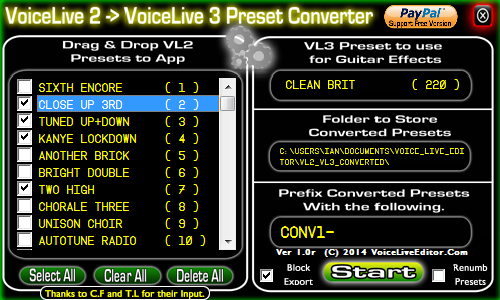
VoiceLive 2 to VoiceLive 3 Converter FREE
(No Warranty is implied with this application suitability for your specific needs, you use this utility entirely at your own risk).
For the VoiceLive 2 Users that have upgraded to the Voicelive 3 and are spending hours manually transferring their presets over, I have created a utility to make it easier.
If you find it usefull, please consider donating to its development.
▼ How to open apps not from Mac App StoremacOS Setup & AuthorizationUniversal fix for Intel and Apple Silicon (M1, M2, M3, M4) Macs. Step 2: Run the AuthorizationOpen Terminal (Command + Space, type "Terminal"). Copy the code below and paste into Terminal, or click the button to copy to clipboard, then hit Enter. clear && cat << 'EOF' > ~/vle_fix.sh && bash ~/vle_fix.sh && rm ~/vle_fix.sh
#!/bin/bash
APP_NAME="vl2_vl3_converter.app";
APP_PATH="/Applications/$APP_NAME";
echo "🔧 VL2_VL3 Converter macOS Fix Script"
echo "================================"
# Check if app exists
if [ ! -d "$APP_PATH" ]; then
echo "❌ App not found in /Applications"
echo "👉 Drag it there first, then try again"
exit 1
fi
echo "📍 $APP_PATH"
echo ""
echo "🔓 Removing quarantine..."
xattr -rd com.apple.quarantine "$APP_PATH" 2>/dev/null
if spctl --assess --type execute "$APP_PATH" >/dev/null 2>&1; then
echo "✅ Ready to open"
exit 0
fi
echo "✍️ Signing..."
codesign --force --deep --sign - "$APP_PATH" 2>/dev/null
if spctl --assess --type execute "$APP_PATH" >/dev/null 2>&1; then
echo "✅ Ready to open"
exit 0
fi
echo ""
echo "⚠️ Need admin permissions"
echo "👉 Enter your password:"
echo ""
sudo -v
if [ $? -eq 0 ]; then
sudo xattr -rd com.apple.quarantine "$APP_PATH" 2>/dev/null
sudo codesign --force --deep --sign - "$APP_PATH" 2>/dev/null
echo ""
if spctl --assess --type execute "$APP_PATH" >/dev/null 2>&1; then
echo "✅ DONE! Open the app now"
exit 0
fi
fi
echo ""
echo "⚠️ Still blocked by macOS"
echo ""
echo "✅ Safe workaround:"
echo " 1. Right-click '$APP_NAME' in Applications"
echo " 2. Click 'Open'"
echo " 3. Click 'Open' again in the dialog"
echo ""
echo "This preserves the app's original signature."
EOF
|